1. Platform Overview
InfoAudio is a complete radio station automation system comprising 58 executable applications
and 17 shared libraries. The platform covers real-time on-air playout, music catalog management,
scheduling, recording, audio editing, external system integration, and report generation.
Technology Stack
Component Technology
Framework .NET Framework 4.5.2 (C#) Desktop UI WPF + DevExpress v18.2 Audio Engine BASS.NET v2.4.7.4 / v2.4.14.1 Database SQL Server + Entity Framework 5 Reports Stimulsoft Reports 2016.1 Serialization Newtonsoft.Json v10.0.3 Windows Services Topshelf v4.2.1 Obfuscation SmartAssembly Build / CI Azure DevOps Installer Inno Setup 5 Localization 5 languages (pt-BR, en-US, es-ES, fr-CA, de-DE)
Application Classification
Tier Criteria Count Examples
Tier 1 Critical, complex, daily use, active development 5 Player, Recorder, MusicMaster, ProgAuto, VoiceTracker Tier 2 Important, regular use 17 Services Manager, Mixing Editor, ExportaLog, Transcription Tier 3 Utility, occasional use 36 Installer, CreateTool, SoundDevices, ECAD, Backup
InfoAudio — Professional Radio Automation Platform
2. Architecture & Shared Libraries
InfoAudio follows a layered architecture with clear separation between presentation,
business logic, data access, and infrastructure concerns.
APPLICATIONS (58 Executables)
Informa.ViewModel (80+ ViewModels)
Informa.Framework.MVVM
Informa.Business — Business Logic (80+ classes)
Informa.DataBase (EF5 — 3 contexts)
Informa.Audio (BASS.NET wrapper)
Informa.Model — Domain Models (200+ classes)
Publico (Utils)
PlainPipes (IPC)
PlainSockets (IPC)
Language (i18n)
Services.Shared
Layered Architecture — Presentation → Business → Data Access → Domain → Infrastructure
2.1 Domain Models (Informa.Model)
Contains all domain entities (POCOs) with no business logic:
Category Key Models
Events EventoModel, EventoMusicaModel, EventoTestemunhalModelScheduling ProgramaModel, BlocoModel, BlocoItemModelMusic Catalog ArtistaModel, InterpreteModel, CompositorModel, GravadoraModelUsers UsuarioModel, GrupoModel, PermissaoModelConfiguration ConfiguracaoGeralModel, ConfiguracaoMusicMaster, ConfiguracaoCloudModelReports Filters and layouts for 13 report types
2.2 Data Access (Informa.DataBase)
Entity Framework 5 with three EDMX contexts:
Context Database Purpose
InformaModel.edmxInforma (main) Events, Scheduling, Catalog, Users, Settings InformaLogModel.edmxInformaLog Audit trails, execution history
2.3 Database Migrations (Informa.DataBase.SQL)
129 SQL scripts embedded as resourcesNaming convention: Informa 1.0.0.X.sql and InformaLog 1.0.0.Y.sql
Command separator: /*|Quebra Script|*/
Atomic execution via TransactionScope
AtualizaBancoDados compares current vs. target version and applies scripts sequentially
2.4 Business Logic (Informa.Business)
80+ classes covering all broadcast station operations:
Domain Key Classes
Events EventoBusiness, GridExecucaoBusinessScheduling ProgramacaoBusiness, BlocoBusiness, BlocoItemBusinessCatalog CatalogoBusiness, CueStreamBusinessUsers LoginBusiness, UsuarioBusiness, PermissaoBusinessIntegrations IntegracaoBusiness, InformaCloudBusinessReports ReportBusiness + specializations (ECAD, Event, Music)
2.5 Audio Engine (Informa.Audio)
Class Responsibility
AudioPlayback, device management MixagemCrossfades, volume control EdicaoAudio editing operations AudioInfoMetadata (format, duration, channels, RIFF/CART/BSI headers) EnumDeviceAudio device enumeration
Codecs: WAV, MP3, AAC, AC3, FLAC, MIDI, WMA, WV
2.6 IPC Infrastructure
Named Pipes (PlainPipes)
Servidor.cs — listens on named pipeCliente.cs — connects to pipe serverGerenciadorMensagens — structured messages (prefix|content)Bidirectional, async, optimized (sends only on change)
TCP Sockets (PlainSockets)
Servidor.cs, Cliente.cs, Pacote.csTCP communication for remote processes
Used for: Satellite, NDI, Cloud integration
2.7 Additional Shared Libraries
Library Purpose
Informa.ViewModel80+ presentation ViewModels (Scheduling, Reports, Security, Settings) Informa.Framework.MVVMViewModelBase, DelegateCommand, ViewModelLocator Informa.CommonWPFShared WPF controls (e.g., database configuration dialog) Informa.Languagei18n resources (.resx) — 5 cultures with auto-generated Designer classes Informa.MessageInternationalized log messages Informa.Licenca.ValidacaoLicense validation, hardware fingerprint, offline contingency Informa.TogglesFeature flags (ToggleManager, ToggleToVisibilityConverter) Informa.Services.SharedWindows Service framework (ServiceBase, Topshelf hosting, JSON config) PublicoCentral utilities: logging, security, WPF converters, system info, settings
3. Tier 1 — Critical Applications
Mission-critical applications with the highest complexity, used daily in production
and under active development.
The primary on-air player for live radio broadcasting. Manages the real-time execution grid,
audio mixing, and integration with studio equipment.
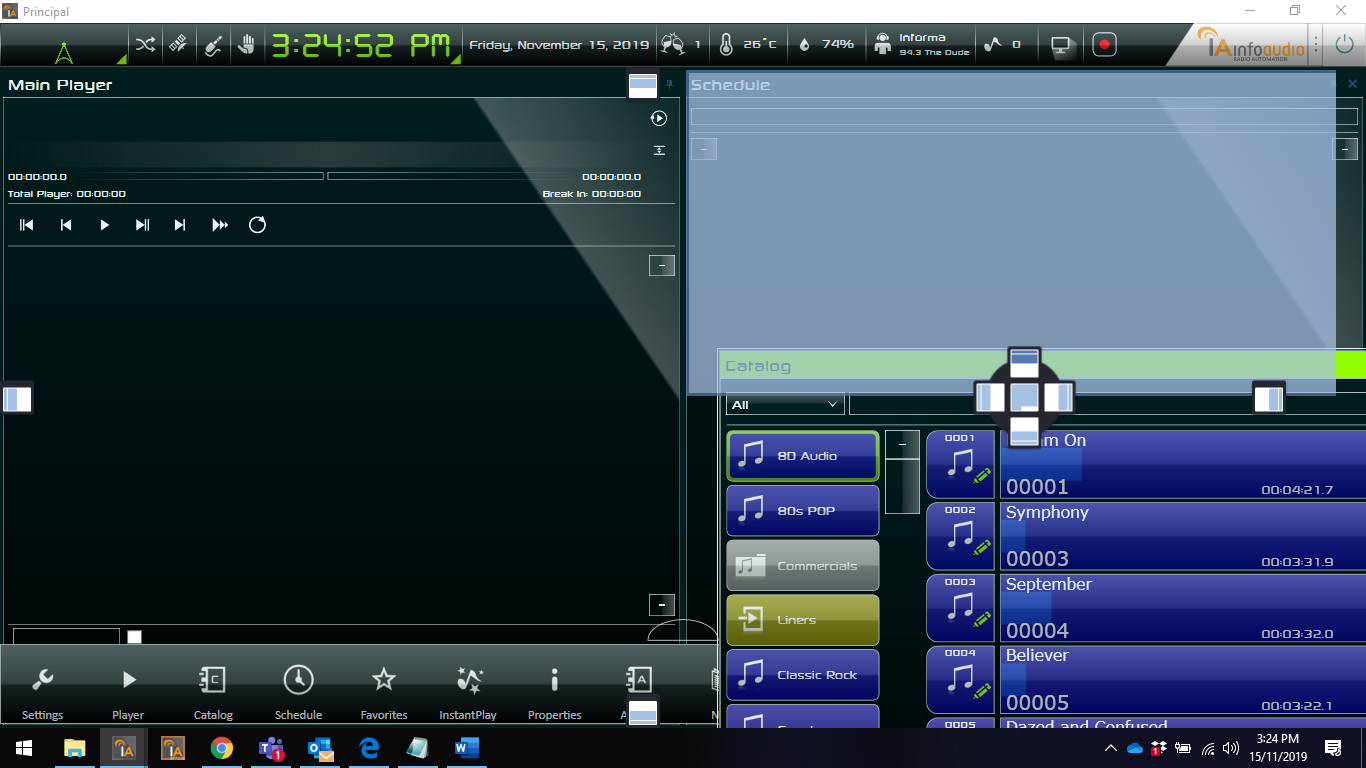
Player Desktop — Catalog browsing with Schedule panel and customizable layout
Project Informa.Player.Desktop/Informa.Player.Desktop.csprojType WinExe (WPF) Pattern MVVM with multiple specialized ViewModels UI WPF + DevExpress v18.2 (docking, grids, workspace persistence) Audio BASS.NET — ASIO + WASAPI, 32/64-bit support Mutex Global\InformaInfoAudioDesktop (single instance)
Key Features
Real-time execution grid with live updates
Virtual mixer with dynamic device switching
Persistent and restorable layout (DevExpress docking)
InstantPlay (instant jingle/sound effect playback)
Memory and resource monitoring
RDS text generation
ASIO support (license-gated: FeatureLicenca.ASIO)
Inter-Process Communication
Named Pipe: "ConexaoInfoAudioGravador" — bidirectional
MusicMaster Service
→
Player
Named Pipe: "InfoAudioMusicMasterSync" — receives sync notifications
Integrations
MusicMaster
vMix
TriCaster
NDI
VLC
Satellite
Spotify
Cloud
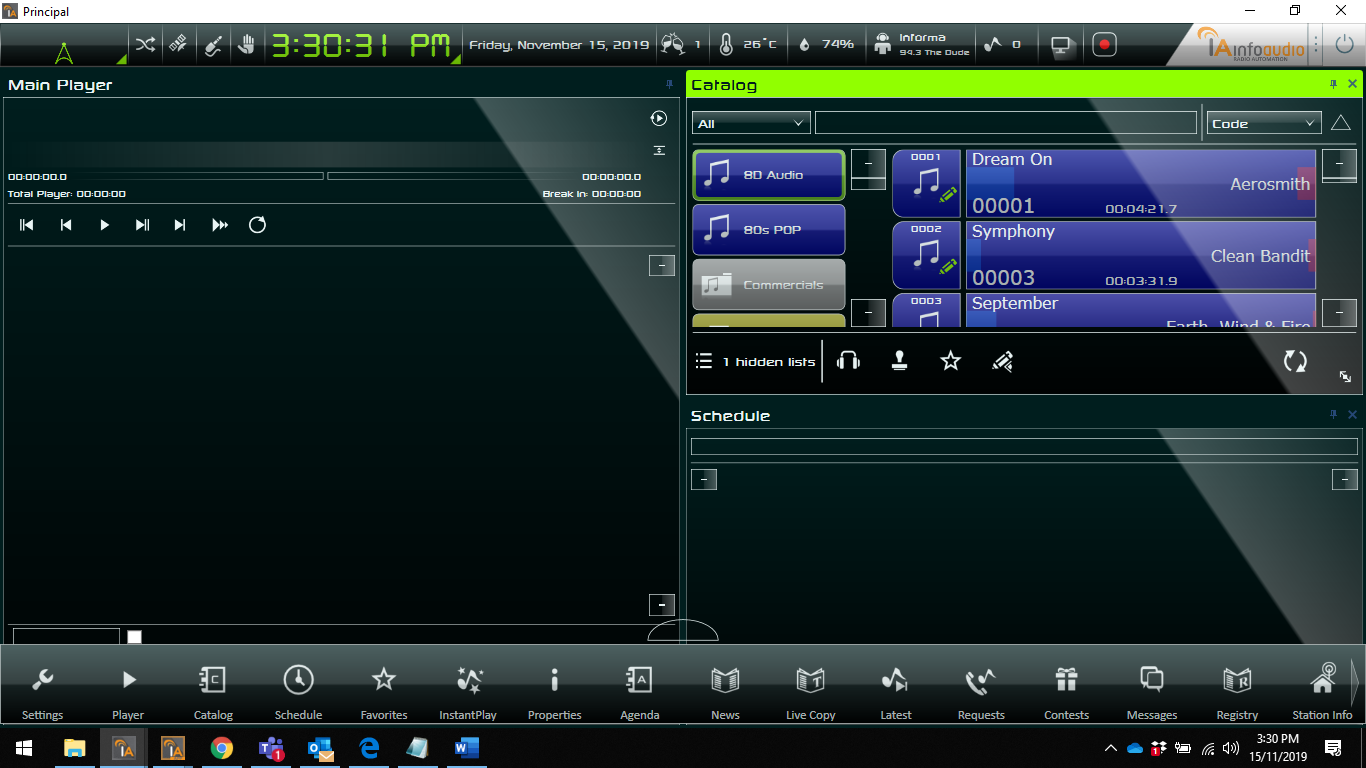
Player Desktop — Full interface showing menu bar with all available functions
Professional-grade studio recorder. Captures audio from ASIO or WASAPI devices and encodes
to MP3, FLAC, or WAV. Operates in tandem with the Player Desktop.
Project Informa.Gravador/Informa.Gravador.csprojPattern MVVM (custom ViewModelBase) UI WPF with custom controls (14 XAMLs: VU meter, buttons, grids) Audio BASS.NET — dual-mode ASIO + WASAPI Mutex Global\GravadorInfoAudioLaunch Informa.Gravador.exe ConexaoInfoAudioGravador true|false
Audio Modes
ASIO Mode
Direct professional device access
Paired stereo channels
Push stream for input, mixer for output
WASAPI Mode
Windows Audio fallback
Callback-based capture
Loopback device support
Supported Encoders
Format Configuration
MP3 160, 190, 240, 320 kbps (libmp3lame) FLAC 16/24-bit, compression level 5 WAV 16/24-bit PCM
Full bidirectional integration with MusicMaster software for music catalog synchronization
and schedule management.
Components
Component Project Type
Plugin (UI) Informa.MusicMaster.PluginWPF Windows Service Informa.MusicMaster.WindowsServiceTopshelf CLI Informa.MusicMaster.CLIConsole Aggregator Informa.MusicMaster.AgregadorPorCodigoWPF
Service Details (IntegradorMusicMaster)
HTTP Listener on 2 configurable ports: schedule changes + metadata updates
Named Pipe notification to Player: "SCHEDULE_CHANGED|timestamp", "METADATA_CHANGED|timestamp"
Periodic sync with configurable interval (minutes)
Two-way sync: InfoAudio ↔ MusicMaster
NexusServer integration via HTTP
Database: Entity Framework 5 — reads/writes TabelaGeral, ConfiguracaoMusicMaster
Automated scheduling system. Monitors folders for XML/TXT/CML files and imports
broadcast schedules automatically.
Components
Component Project Type
Plugin (UI) Informa.ProgAuto.PluginWPF Windows Service Informa.ProgAuto.WindowsServiceTopshelf Console Informa.ProgAuto.ConsoleConsole
Import Formats
Format Description
XML Native InfoAudio format TXT Text-based schedule grid CML Mixed format
Processing Pipeline
MonitorBusiness
→
InterpretadorFactory
→
ProcessadorBusiness
→
ImportadorBusiness
Voice tracking application that allows DJs to record voice inserts synchronized with the
pre-programmed music schedule.
Pattern MVVM Light (GalaSoft) — strict IoC SimpleIoc (Service Locator) Audio BASS.NET — playback and recording devices UI WPF + FontAwesome.WPF v4.7
Injected Services
Interface Purpose
IAudioServiceDevice enumeration (playback + recording) IBlocoServiceLoad schedule blocks IConfiguracoesServiceConfiguration management IReproducaoServicePlayback control
UI Controls
Control Function
ucEnvelopeAudioWaveform visualization ucTrackAudio track display ucStackTrack stack management ucSpectrumFrequency spectrum analyzer ucCursorReproducaoPlayback cursor
4. Tier 2 — Important Applications
Applications with regular use and important operational functions,
including all Windows Services and their companion UIs.
Waveform-based audio editor for CUE point marking, fade in/out, and event editing. Uses a
hybrid WPF/WinForms architecture via WindowsFormsHost.
Audio BASS.NET (file operations, no output device) IPC Eneter Socket (ServerEneterSocket) — bidirectional with Player Database WCF Web Services: RealizaLogin(), SalvaEvento(), RetornaAudioSemCompactacao() Launch 8 command-line parameters (service URL, user GUID, password, server, event GUID, etc.)
Waveform editing with visual CUE markers
Fade in/out point setting, intro/refrain section marking
Jingle (vinheta) insertion support
Automatic audio cache management
Central management console for all InfoAudio Windows Services. Provides service discovery,
monitoring, control, and configuration from a unified UI.
Service discovery, status monitoring (1-second polling), start/stop/restart
Service installation and uninstallation
Per-company configuration (multi-tenant)
Log file viewer
Multi-instance support (e.g., "ServiceName$Instance")
45+ message types for decoupled MVVM communication
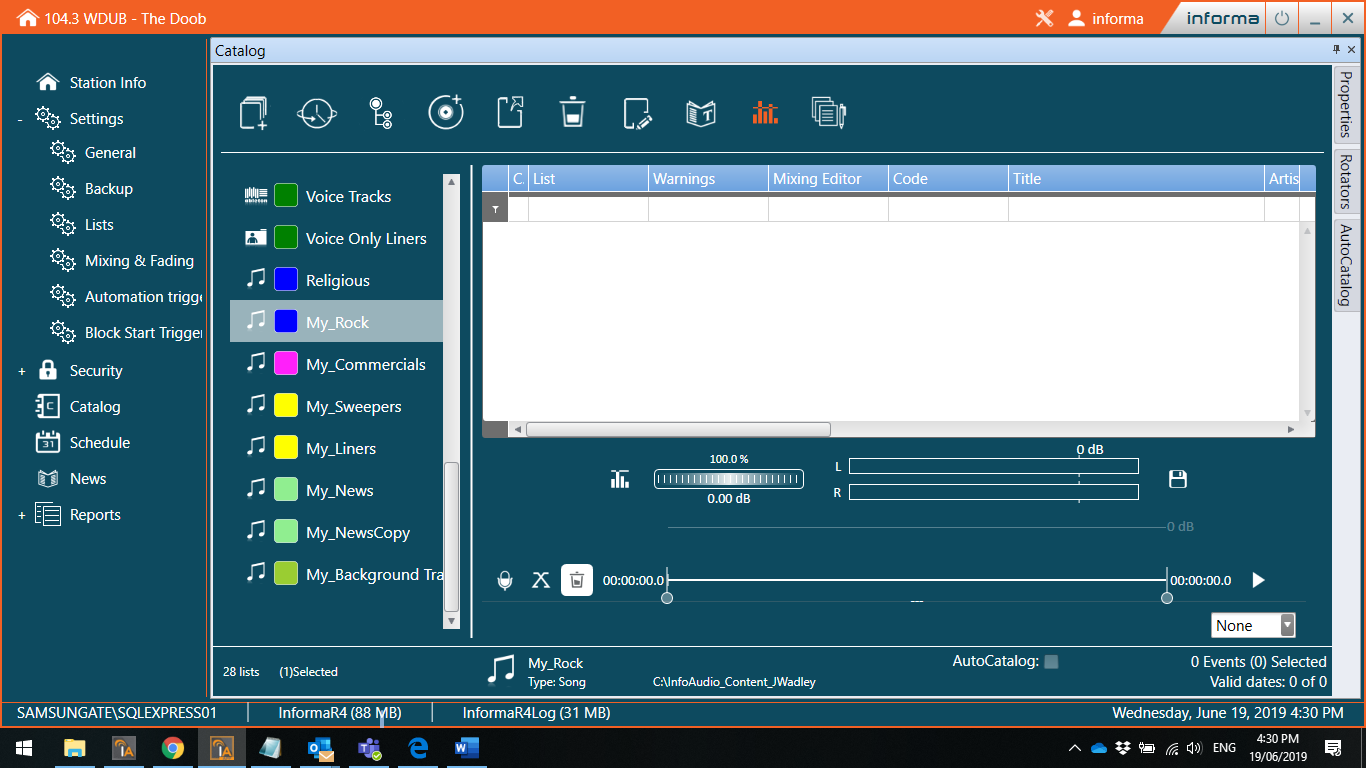
BackOffice — Catalog management with integrated audio marks editor
Windows Services
Service Name Purpose IPC Key Feature
Integrador (Cloud)Cloud integration
HTTP REST
Queue-based processing, SAK auth, Integrator SDK
InfoXML XML file processing for ProgAuto import
File System
1-second timer, 10-second startup delay
ExportaLog Automatic log export
File System
Job-based with templates, parallel execution, dynamic path parser
MidiaIngest Automatic media file ingestion
File System + DB
Folder monitoring, auto-cataloging, metadata extraction
Transcription Audio-to-text transcription
File System
Whisper CLI (OpenAI), 10-min timeout, metrics tracking
RemoteVoiceTracker Remote voice tracking service
—
Remote session management
ShadowConfig Multi-station failover config sync
File System
Network monitoring, 1-minute interval (legacy implementation)
Plugin & UI Companions
Application Purpose Companion Service
ExportaLog Plugin Log export configuration UI ExportaLog Service ExportaLog WPF Log export visual interface ExportaLog Service InfoXML Plugin XML import configuration UI InfoXML Service Transcription Plugin Transcription monitoring UI Transcription Service MidiaIngest WPF Media ingestion visual interface MidiaIngest Service Integrador WPF Cloud integration visual interface Integrador Service ProgAuto Console Scheduling automation CLI ProgAuto Service MusicMaster CLI MusicMaster operations CLI MusicMaster Service
5. Tier 3 — Utilities & Tools
Utility applications for installation, licensing, audio device management,
media processing, reporting, backup, and broadcast support.
5.1 Installation & Updates
Application Type Purpose
Installer (Informa.Instalador)WinForms Interactive setup: database config, IIS app creation, connection pooling, INI generation, encryption Updater (Informa.Atualizador)Console Automatic updates: ZIP/UNZIP, version storage (CentralAplicativos), process wait + auto-launch CreateTool WinForms Initial database population: schema, default user, menus, permissions, events, themes, player layout DataBase.SQL Console Schema migration executor: AtualizaBancoDados applies 129+ embedded SQL scripts Splash WPF Application splash screen during loading
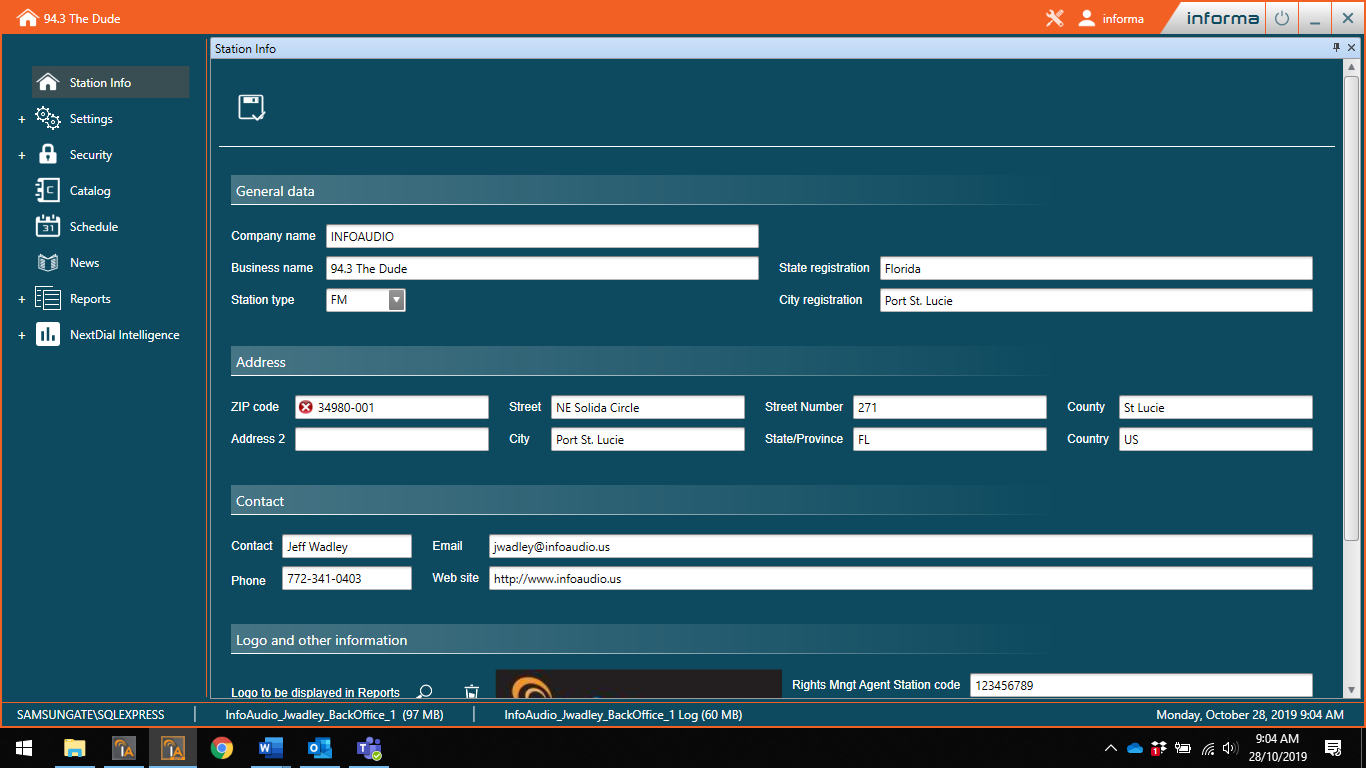
BackOffice — Station Info configuration screen with general data, address, and contact fields
5.2 Licensing
Application Type Purpose
License Activation WinForms Activate InfoAudio license against central server License Validator WinForms Validate installed license status and validity
Hardware fingerprinting (FingerPrint) for machine binding
Central server validation with offline contingency mode
System clock tamper detection
Per-company (EmpresaId) licensing
5.3 Audio & Device Tools
Application Type Purpose
SoundDevices WPF Audio device configuration. Launched by Player, monitors parent process. BASS.NET v2.4.14.1 InfoCue WPF CUE point resolver. Dual-mode: config UI or batch process via command-line event code ICRip WinForms CD ripping with Freedb metadata lookup Audio Protection WPF Audio file protection utility Mixing Console Config WPF Hardware mixing console configuration
5.4 Media Processing
Application Type Purpose
ExtratorTKM WPF TrackMedia metadata extraction and TKM-to-MP3 conversion. Per-folder mutex ProcessaTKM WinForms Process extracted TrackMedia files with Player IPC AutoCatalog Config WPF Auto-cataloging configuration AutoCatalog Console Console Auto-cataloging batch execution AutoCatalog Service Service Auto-cataloging Windows Service
5.5 Reports & Administration
Application Type Purpose
ReportEdit WinForms Report designer (Stimulsoft 2016.1). 13 report types: Codes, Operations, Schedules, Vouchers, Events by Artist, Aired Music, ECAD, Events, Registry, Uncataloged Audio, Lists, Music by Artist/Composer, Planned vs. Actual ECAD WPF Royalty rights management (ECAD). MVVM Light + DevExpress v16.2 Business Central WPF Business management module
5.6 Backup & Maintenance
Application Type Purpose
Backup Console Automated backup execution via WebService. Credentials: EmpresaId, LoginWebService, SenhaWebService Backup Config WinForms Backup scheduling via Windows Task Scheduler (v2.5.21)
5.7 Broadcast & Communication
Application Type Purpose
Satellite Console IP broadcast trigger testing: TCP server (generator) + TCP client (receiver). Port 15000 default InfoRelay WPF Information relay between stations InfoRemote WPF Remote operation control BreakMonitor WPF Commercial break monitoring Busy WPF Station "busy" status utility
5.8 Information & Visualization
Application Type Purpose
InfoViewer WPF System information viewer Weather (Clima)WPF Weather information utility Catalog Export Console Media catalog data export
5.9 Legacy & Miscellaneous
Application Type Purpose
IA9Tools WinForms Legacy IA9 compatibility and migration tools WPF Accessories WPF WPF utility accessories
6. External Integrations
InfoAudio integrates with video switchers, streaming services, cloud platforms,
and satellite broadcast infrastructure.
Protocol HTTP on port 8088 Endpoint http://{IP}:8088/api?Function={cmd}Responses XML
Overlay management (prefix "IA ")
Input management: Audio, Video List, Browser, NDI
Layer control, automatic camera rotation
Protocol HTTP on port 5952 Endpoint http://{IP}:5952/v1/{endpoint}Responses JSON
VLC NDI input management
Version detection via /version
Protocol TCP Sockets (configurable port) Source Name "InfoAudio NDI"
NDI source control with resolution tracking
Delay and action throttling controls
Protocol TCP or HTTP (port 9000) Launch VLC.exe -I http --http-port 9000 --vout=ndi --aout=ndi
Process management (launch/kill)
NDI output pre-initialization
Auth OAuth 2.0 (Client Credentials) API api.spotify.com/v1/OAuth Port 60403 (local HTTP Listener)
SearchTrack() — Spotify catalog searchAuto token refresh, maps tracks to EventoModel
Base URL voicetracker.informa.solutionsAuth API Key (Bearer token)
POST /api/company — activate companyPOST /api/schedule — send schedulePOST /api/voice-track — send voice tracking data
Protocols TCP Server + UDP Server Default Port 15000
Remote command dispatch to satellite stations
Multi-client TCP connections + UDP broadcast
Joystick hardware input support
Message interpreter and dispatch factory
7. Windows Services Infrastructure
All modern Windows Services are built on a shared framework with Topshelf hosting,
JSON configuration, and standardized logging.
Service Framework Hierarchy
WindowsServiceBase<T> (Topshelf hosting)
  └― ServiceBase (abstract)
       ├― IntegradorMMService      (MusicMaster)
       ├― ProgAutoService          (ProgAuto)
       ├― IntegradorService        (Cloud)
       ├― InfoXMLService           (InfoXML)
       ├― ServiceExportaLogNovo    (ExportaLog)
       ├― MidiaIngestService       (MidiaIngest)
       └― TranscriptionService     (Transcription)
Standard Directories
Type Path
Configuration %ProgramData%\Informa\Services\Config\Logs %ProgramData%\Informa\Services\Logs\Language %ProgramData%\Informa\Idioma
Batch Operations (CLI)
Command Action
start-allStart all registered services stop-allStop all running services install-allInstall all services uninstall-allUninstall all services
Service Communication Summary
Service IPC Method Port / Protocol
IntegradorMusicMaster HTTP Listener + Named Pipes 2 configurable ports + InfoAudioMusicMasterSync ProgAuto File System + Database Folder monitoring Integrador (Cloud) HTTP REST Cloud API InfoXML File System Folder monitoring ExportaLog File System Configurable paths MidiaIngest File System + Database Folder monitoring Transcription File System Audio directory ShadowConfig File System Network config
9. Complete Application IndexAll 58 executable projects at a glance.
# Project Type Tier
1 Informa.Player.Desktop WPF T1 2 Informa.Gravador WPF T1 3 Informa.MusicMaster.Plugin WPF T1 4 Informa.MusicMaster.WindowsService Service T1 5 Informa.ProgAuto.Plugin WPF T1 6 Informa.ProgAuto.WindowsService Service T1 7 Informa.VoiceTracker WPF T1 8 Informa.MarksEditorApp WPF/WinForms T2 9 Informa.Services.Manager WPF T2 10 Informa.Integrador.WindowsService Service T2 11 Informa.InfoXML.WindowsService Service T2 12 Informa.ExportaLog.WindowsService Service T2 13 Informa.MidiaIngest.WindowsService Service T2 14 Informa.Transcription.WindowsService Service T2 15 Informa.RemoteVoiceTracker.WindowsService Service T2 16 Informa.ShadowConfig.WindowsService Service T2 17 Informa.Services.Transcription WPF T2 18 Informa.MidiaIngest.WPF WPF T2 19 Informa.Integrador.WPF WPF T2 20 Informa.ExportaLog.WPF WPF T2 21 Informa.ExportaLog.Plugin WPF T2 22 Informa.InfoXML.Plugin WPF T2 23 Informa.Transcription.Plugin WPF T2 24 Informa.ProgAuto.Console Console T2 25 Informa.MusicMaster.CLI Console T2 26 Informa.Instalador WinForms T3 27 Informa.Atualizador Console T3 28 Informa.CreateTool WinForms T3 29 Informa.DataBase.SQL Console T3 30 Informa.Splash WPF T3 31 Informa.Licenca.Ativacao WinForms T3 32 Informa.Validador.Ativacao WinForms T3 33 SoundDevices WPF T3 34 Informa.InfoCue WPF T3 35 ICRip WinForms T3 36 Informa.ProtecaoMAudio WPF T3 37 Informa.Configurador.Mesa WPF T3 38 ExtratorTKM WPF T3 39 Informa.ProcessaTKM WinForms T3 40 AutoCatalogConfig WPF T3 41 AutoCatalogConsole Console T3 42 AutoCatalogService Service T3 43 Informa.ReportEdit WinForms T3 44 Informa.Ecad WPF T3 45 Informa.CentralNegocios WPF T3 46 Informa.Backup Console T3 47 Informa.Backup.Config WinForms T3 48 Informa.Satelite Console T3 49 InfoRelay WPF T3 50 InfoRemote WPF T3 51 Informa.BreakMonitor WPF T3 52 Informa.Busy WPF T3 53 Informa.InfoViewer WPF T3 54 Informa.Clima WPF T3 55 Informa.IA9Tools WinForms T3 56 Informa.AcessoriosWPF WPF T3 57 Informa.MusicMaster.AgregadorPorCodigo WPF T3 58 Informa.ExportaCatalogo Console T3